Integrated System T control interface options

Overview
Flexible, adaptable and scalable
System T Furniture Fader and Master Tiles allow extremely flexible and adaptable configurations. Used in conjunction with Tempest Control App they provide dedicated hands-on control for solutions built into custom furniture. Additionally, any System T Furniture Fader Tile, Master Tile and/or computer running TCA software can be combined within a single system along with main control surface(s), providing custom solutions to fit any application or environment. For example, a main control surface and two additional remote Furniture Fader Tiles can be connected to a single Tempest Engine.
Fader Tile
Each tile has 16 faders and is the same size as a main touch screen. Each tile has fifteen layers with four banks per layer giving rapid access to 960 paths via dedicated Layer & Bank buttons.
Each fader strip has a 100mm motorised fader, level meter and a collection of status LEDs covering Dynamics, De-ess mode, Dialogue Automix and Remote AFV or Production Automation control. There is a dedicated PFL Solo key plus back stop fader PFL. Additional keys for Mute, AFL and Select control path functions in conjunction with the touch screen interface. An OLED delivers instant visual feedback. Each strip features SSL’s acclaimed ‘Query’ key that allows the user to spill the contributing elements or destinations for a selected fader/path across the control surface, providing instant feedback and mix control either from a channel- or mix-centric view. Querying a channel shows the destinations to which it is routed. Querying a mix bus shows the channels that are contributing to that mix. Querying a Stem Group shows its bus destinations and contributing channels on adjacent tiles.
Master Tile
At the top of the panel are the controls for System T’s flexible monitoring system, which accommodates a wide range of options and supports two-man operation of the console with two complete monitor sections. Four additional studio monitor sections provide control over multiple studio speakers or production spaces. The five push switch encoders and their associated displays on the right hand side are freely assignable.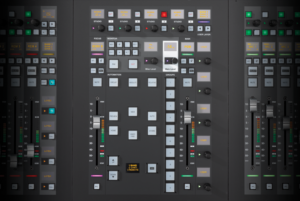
On the left is the Focus Fader, which is assigned to the selected path and works in conjunction with the Channel Tile controls. To the right is a Master fader which can be assigned and locked to any desired path. Between the faders are the controls for the console’s powerful scene automation system and the switches for ten Mute Groups or User Keys.
Features
Hands on, configurable control over signal paths
Furniture Fader Tile
Freely configurable to control a variety of different signal paths with clear, bright colour coding.
Each tile has 16 faders with fifteen layers, and four banks per layer.
Each fader strip has a 100mm motorised fader, level meter and a collection of status LEDs covering Dynamics, De-ess mode, Dialogue Automix and Remote AFV or Production Automation control.
Dedicated PFL Solo key plus back stop fader PFL.
Additional keys for Mute, AFL and Select, which controls a menu of tile functions in conjunction with the touch screen interface.
Three line OLED delivers a variety of visual feedback of data.
Multi function Quick Encoder with three switches.
Each strip features SSL’s acclaimed ‘Super-Q’ key which allows the user to spill the contributing elements or destinations for a selected fader/path across the control surface providing instant feedback and mix control either from a channel- or mix-centric view.
Querying a channel shows the destinations to which the channel is routed.
Querying a mix bus will show the channels that are contributing to that mix.
Master Tile
A Focus Fader which follows the assignment of the selected channel
A Master Fader which can be assigned and locked to any desired path
Dedicated scene automation controls and OLED
Comprehensive control room monitor controls providing control over the flexible System T monitoring system
Four additional studio monitor outputs provide control over multiple studio speakers or production spaces
5 push-switch encoders freely assignable as user keys
10 buttons switchable between Mute Groups and User Keys
